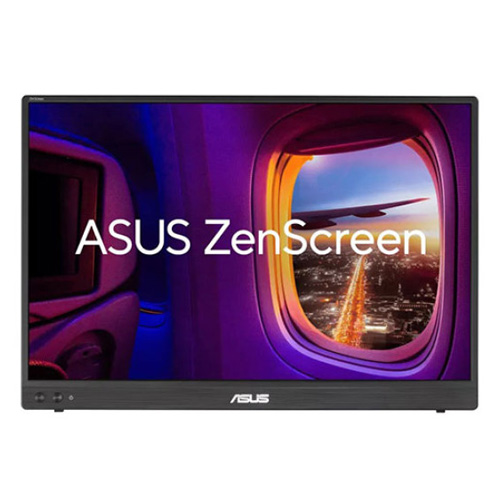
ASUS 16 inch ZenScreen Portable Monitor MB16FC
Overview :
Portable Monitor – 16-inch 16:10 WUXGA (1920 x 1200) IPS panel, Power Pass Through, Auto Rotate, tripod, USB Type-C®, mini-HDMI®, Flicker Free, Low Blue Light, FSC Mix-certified
16-inch 16:10 1920×1200 resolution and an impressive 84% screen-to-body ratio brings you expansive viewWith Power Pass Through, the MB16FC portable monitor can be powered by a laptop, or deliver power to a laptop via pass-through chargingAutomatically sense its orientation and switch the monitor between landscape and portrait modes via DisplayWidget Center softwareASUS Eye Care monitors feature TÜV Rheinland-certified Flicker-free and Low Blue Light technologies to ensure a comfortable viewing experience
Rich connectivity with two full-function USB-C® ports plus a mini-HDMI® port
ASUS ZenScreen MB16FC is a 16-inch portable IPS monitor featuring a WUXGA (1920 x 1200) resolution. This 16:10 display provides more viewing area, making it the ideal secondary display to extend workspace for hybrid workers. With autorotation feature, giving ZenScreen the versatility to be used in either landscape or portrait orientation. Also, with power pass-through feature and USB-C ports, you can have two-way power delivery function that offers flexibility on the go.
More immersive
Brings you a stunning 16:10 display that’s both wider and more vibrant, supporting up to 1920×1200 resolution and an impressive 84% screen-to-body ratio. Enjoy an expansive, vivid view all packed into a sleek, lightweight extended portable monitor.
Power pass through
There is the two-way power delivery function built in. The MB16FC portable monitor can be powered by a laptop, or deliver power to a laptop via pass-through charging when plugged into a USB-C power bank or AC adapter and outlet*.
One cable is all you need
MB16FC features rich connectivity with dual USB-C and mini-HDMI ports. A single USB-C cable* is all you need to duplicate or extend your laptop screen. USB-C handles both power and video signal transmission, so it’s simply a matter of plug-and-play when it’s time to level up your work efficiency.
Note* Need to check whether the USB-C port of your laptop supports DP Alt mode prior to use. Or You can use HDMI connectivity along with USB-C (DC-IN) as power input instead if your laptop does not support USB-C (DP)
Automatic screen orientation
When connected to a Windows PC, the ASUS DisplayWidget Center tool* enables MB16FC to sense its orientation and automatically switches the display between landscape and portrait modes.
ASUS Eye Care
ASUS Ultra-Low Blue Light technology reduces potentially harmful blue light emissions and includes additional features that are beneficial to those who spend long hours in front of a display.
ASUS Blue Light Filter
The ASUS Blue Light Filter protects viewers from harmful blue light. This feature offers a range of filter settings that are easy to access via the intuitive OSD menu.
ZenScreen MB16FC has passed stringent performance tests and is certified by TÜV Rheinland laboratories, a global provider of technical, safety, and certification services.
Specification :
| Model | ZenScreen MB16FC |
| Display | |
| Panel Size (inch) | 16 |
| Aspect Ratio | 16:10 |
| Display Viewing Area (H x V) | 344.68 x 215.42mm |
| Display Surface | Anti-Glare |
| Backlight Type | LED |
| Panel Type | IPS |
| Viewing Angle (CR≧10, H/V) | 178°/ 178° |
| Pixel Pitch | 0.179mm |
| Resolution | 1920×1200 |
| Brightness (Typ.) | 300cd/㎡ |
| Contrast Ratio (Typ.) | 1000:1 |
| Display Colors | 16.7M |
| Response Time | 5ms(GTG) |
| Refresh Rate (Max) | 75Hz |
| Flicker-free | Yes |
| Features | |
| Trace Free Technology | Yes |
| SPLENDID Technology | Yes |
| Color Temp. Selection | Yes (4 modes) |
| Auto Rotation:Yes, supported by DisplayWidget Center | |
| QuickFit | Yes (Photo/Alighment Grid) |
| HDCP | Yes, 1.4 |
| DisplayWidget | Yes, DisplayWidget Center |
| Low Blue Light | Yes |
| Power Pass-through | Max. 65W |
| AudioSpeaker | No |
| I/O Ports | |
| USB-C x 2 (DP Alt Mode) | |
| Mini HDMI x 1 | |
| Earphone Jack | Yes |
| Signal Frequency | |
| Digital Signal Frequency | USB-C: 30~100KHZ (H) / 59~75Hz(V) |
| Mini HDMI: 30~100KHZ (H) / 59~75Hz(V) | |
| Power Consumption | |
| Power Consumption | ≤5.62W |
| Power Saving Mode | <0.5W |
| Power Off Mode | <0.3W |
| Voltage | 100-240V, 50/60Hz |
| Mechanical Design | |
| Height Adjustment | No |
| Kensington Lock | Yes |
| 1/4″ Tripod Socket | Yes |
| Dimensions (Esti.) : | |
| Phys. Dimension (W x H x D) | 35.8 x 24.6 x 1.1 cm (14.09″ x 9.69″ x 0.43″) |
| Box Dimension (W x H x D) | 44.3 x 31.8 x 9.0 cm (17.44″ x 12.52″ x 3.54″) |
| Weight (Esti.) : | |
| Net Weight | 0.90 kg (1.98 lbs) |
| Gross Weight | 2.00 kg (4.41 lbs) |
| 1.90 kg (4.19 lbs) | |
| Accessories (vary by regions) | ZenScreen sleeve |
| Warranty Card | |
| USB-C cable | |
| Quick start guide | |
| Power adapter | |
| Mini HDMI to HDMI cable |